
Read Time: 4.5 min

Together with

Here’s the route for today
📩 The best way to network
Why LinkedIn doesn’t work
Why emails work
Combine LinkedIn and emails
👋 Find recruiter emails using these tools
👿 NYC mayor indicted | Meta glasses | and more news
TOPIC
The Best Way to Network

🔵 LinkedIn is dead, use emails instead
If you’re getting ghosted by recruiters on LinkedIn, you’re not alone.
I get at least 2 coffee chat requests a week from folks trying to enter the job market and they all face the same problem.
They all tried messaging recruiters on LinkedIn and it just doesn’t seem to work.
This, unfortunately, is the new reality of LinkedIn. Not only is it a bad source of job searching, but it’s also not a great way to build connections.
However, LinkedIn isn’t completely useless, it’s still good at one thing - finding high-quality contacts.
In this article, I’ll explain how to find high-quality contacts on LinkedIn, and then how to reach them via email.
Why LinkedIn doesn’t work
Getting ghosted by recruiters on LinkedIn?
It comes down to the nature of social media apps.
LinkedIn may be professional and offer job postings, but it’s still a social media app at its core, it’s no different than Instagram or TikTok.
And like any other social media app, people (including recruiters) tend not to go on them every day.
Do you go on LinkedIn every day? Probably not right?
On the other hand, let’s look at what works better.
Why emails work best
Emails have a higher response rate from recruiters.
Why? Because, unlike LinkedIn, people tend to check their emails daily to clear their inboxes, especially in the morning.
On top of that, emails feel more personalized.
So, if you schedule your email at 8 am or 9 am, the chances of a recruiter coming across your message are substantially higher.
Combining LinkedIn and emails
Now that you understand the nature behind LinkedIn and email, the only thing left is to send those emails.
But where do you find recruiter emails?
This is where LinkedIn is useful because without it, finding contact info on recruiters is nearly impossible.
LinkedIn houses millions upon millions of profiles. To find the ones you need:
Make a list of companies you would want to work at
Then go to their page and select People like this
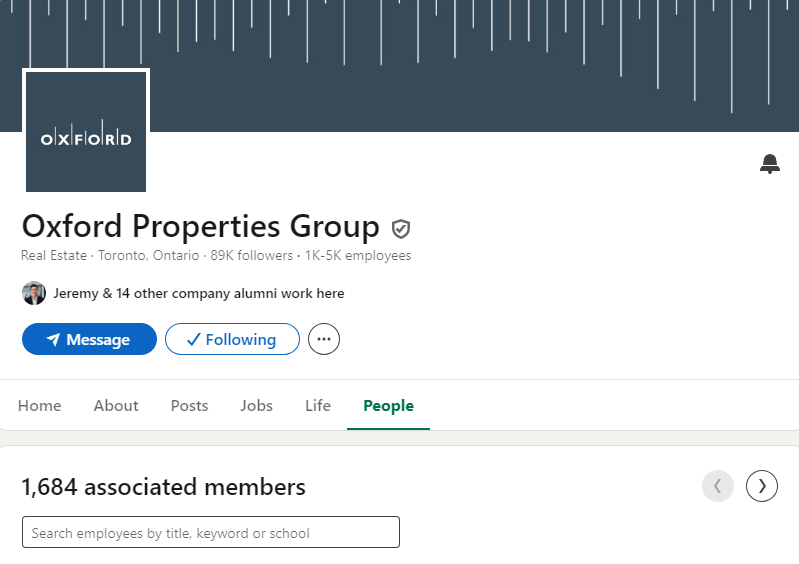
Next, in the search bar type these keywords: “talent acquisition” to filter for recruiters
Schedule an email in the morning and ask for a coffee chat.

Closing Thoughts:
If I had to start my job search from scratch, I would focus 90% of my networking efforts on emailing.
In the next section, I’ll show you an example of how to use the tools.
See you next Tuesday 🤝
-Michael Ly
PERSONAL DEVELOPMENT
Copy This Strategy
Out of all the tools, Prospeo is my favorite. So far, it has been 100% accurate, and I don’t need to download it to use. Here’s an example of me using it.
I went to my company’s page and found a recruiter from the people’s tab.

Next, I went on Prospeo and entered her LinkedIn URL.

And just like that, it pulls up her exact contact info!
TOGETHER WITH ONELEET
Want SOC 2 compliance without the Security Theater?

Get the all-in-one platform for SOC 2
Build real-world security 💪
Penetration testing, compliance software, 3rd party audit, & vCISO
THIS WEEK’S NEWS
Running the Web

Interesting stuff I run across on the internet
👿 NYC Mayor indicted on charges of bribery and corruption
👓 Meta claims to now have the world’s most advanced AI glasses
💵 OpenAI restructures into a for-profit company
REFERRALS
Share The Leap Sprint

Refer 1 friend & get the resume I used to land 4 internships and a full-time role in tech! 📬
🚀 Ready-to-use bullet points
🚀 Optimized for ATS systems
🚀 Exact-same resume I use
{{rp_personalized_text}}
Or copy and paste this link: {{rp_refer_url}}

A Message From TLDR
Want a byte-sized version of Hacker News? Try TLDR’s free daily newsletter.
TLDR covers the most interesting tech, science, and coding news in just 5 minutes.
No sports, politics, or weather.